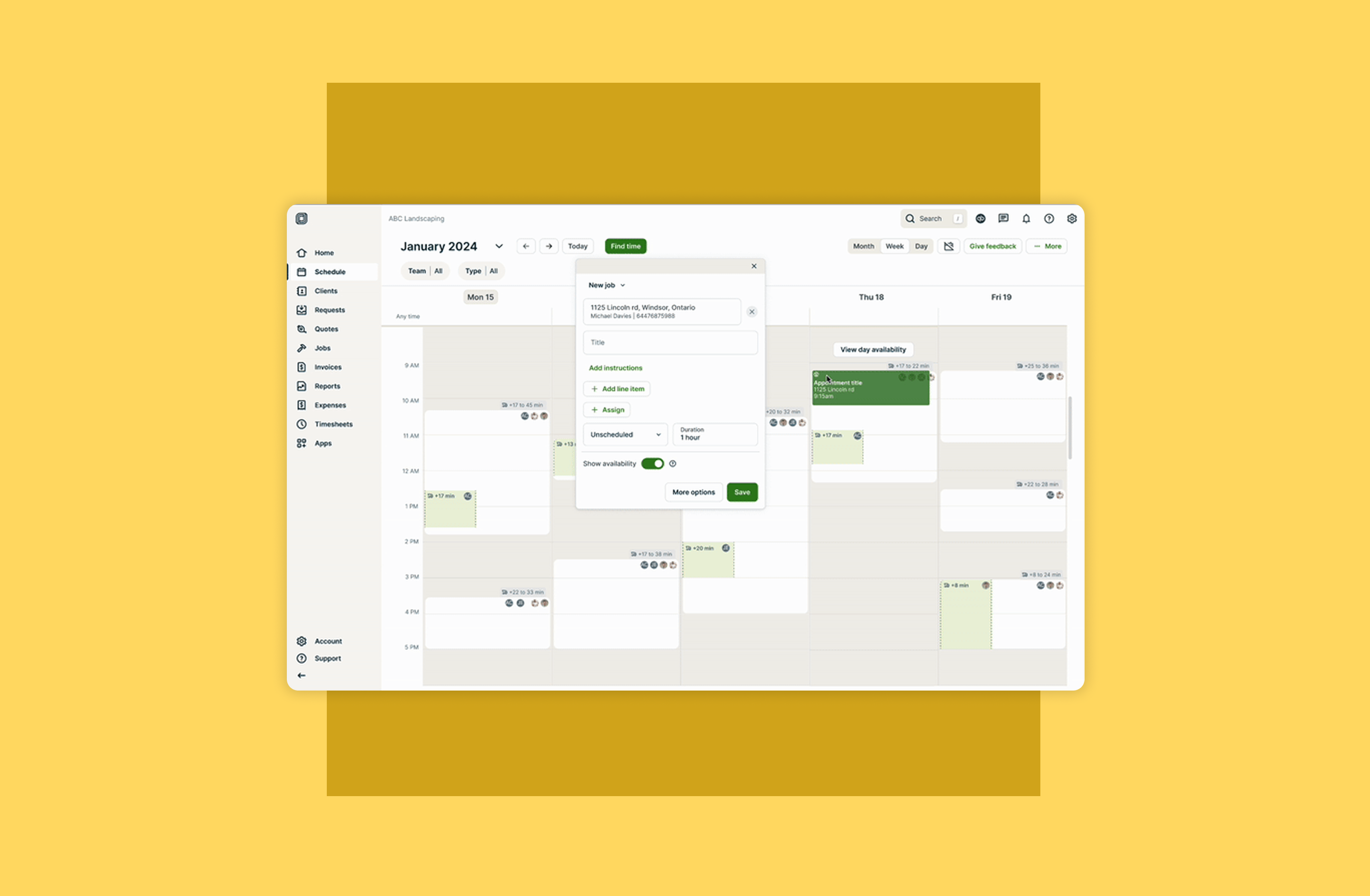
Scheduling is the operational backbone for service businesses, but dense UI and fragmented information turn every decision into cognitive overhead, costing owners 5–15 hours a week and ~$53K in lost reinvestment. I designed a fast, trustable scheduling flow that eliminates mental holds and UI navigation, reducing time to schedule from 6 minutes to 45 seconds and fully removing appointment conflicts. Critically, the solution was built around a constraint model that treats user inputs as structured data, thus laying the foundation for AI-assisted scheduling automation rather than bolting it on later. CSAT improved from 3.4 to 4.3. Conflicts dropped to zero.
Problem
The schedule is the home base of operations for service providers. Making any scheduling decision is a big
cognitive burden, further hindered by floating information and dense UI. This burden costs business owners
between 5 and 15 hours a week, which represent about $53,000 in money not reinvested into their business.
Solution
A novel versatile flow that removes the need to navigate dense UI or to have mental holds, and speeds up the
process of making scheduling decisions that users can trust.
Impact
Reduced time to scheduling from 6 minutes down to 45 seconds
Completely eliminated the generation of conflicts during appointment creation
Designed the foundation AI-assisted scheduling, starting with smart suggestions
Increased the CSAT of the schedule from 3.4 to 4.3
An outdated experience
Jobber's old schedule
For almost 10 years, the Jobber schedule has been basically a digital pen and paper experience. While it “gets
the job done”, it creates extensive non-billable admin time that can be highly inaccurate and that users could
instead spend in doing more payed work.
How do users schedule?
Powered by extensive user research (interviews, surveys, and flow recordings analysis) across different
industries, company sizes and types of schedulers.
To schedule an appointment, users have to answer, determine and hold many requirements and constraints in their
mind. These requirements and constraints are based on the job to be done, the skill required, the availability of
the team, the location where it needs to happen, what the client needs and wants, etc.
Users have to then juggle, alter and reassess these mental holds as they manually sift through a visually dense UI
calendar until they have enough confidence that their choice is feasible and efficient for themselves and for
their client.
As their business grows, these mental holds multiply exponentially and the calendar itself, becoming even denser,
has its usability reduced completely.
Questions that help users determine scheduling requirements and constraints
Experience worsens as business grows
Research showed us that while different industries need to determine slightly different constraints; Ultimately,
the bigger their business is the worse it is to schedule. A company will eventually outgrow what the standard
calendar UI can do, and manually finding available spots (white spaces) becomes an impossible task.
Dense schedules become impossible to read making it impossible to find availability
What is out there?
Modern scheduling solutions try to solve this problem by using personal calendar patterns that don’t work with
multiple-user calendars, and ultimately disregard the complexity of the decision-making, the need for overview, or
the manual labour of a dense UI; which in turn renders the solution unsatisfactory. For example:
All at once
All team member’s schedules are presented at once, leaving the user the intense and time-consuming manual work to
sift through available gaps. These gaps are impossible to present consistently and prominently, leading users to
miss on scheduling opportunities.
User lanes
A tweaked version of “all at once”. Here, the width of appointments are reduced to create user “lanes” or columns
in order to neatly present availability gaps. This alternative is not scalable when the number of users grow, and
at the same time it reduces visibility of the content within the reduced appointments which is important in the
decision-making process.
Suggestions list
A list of suggested time slots is exposed to the user. Because this list is often disconnected from the actual
calendar UI, it is hard for users to understand why those are being suggested and therefore is also hard to
trust them. It also requires the user to cycle through options making the process toil heavy.
A clear example of what not to do
Google calendar, widely used by service providers, has a “find a time” feature that uses an “all at once”
approach which makes it impossible to find visual gaps in the calendar. They also have a “suggestion list” approach
that tries to simplify decision-making, but is ultimately turns toil-heavy and hard to trust.
Striving for innovation
By deeply understanding the user flow and needs, as well as understanding the pitfalls and shortcomings of other
existing solutions; we were able to explore, iterate and test in order to create a new solution that innovates in
the market of scheduling.
Multiple iterations and testing was key to strike a balance and avoid complex dense UI
What is jobber's find a time?
Find a time helps the user focus and quickly find feasible time slots by removing the visual density and noise
from the UI. It also removes the need for mental holds by taking user inputs as proxy to requirements and
constraints, which helps to narrow down options and to highlight recommendations.
Example of proxy:
Adding an address allows to calculate distances, which in turn identifies other appointments in close proximity.
This process is highly flexible. It guides the user choices regardless of order of steps, and provides the option
to switch this feature on and off at any time without losing any progress.
The constraint model powering this flow, where user inputs map to structured requirements, was intentionally
designed to be machine-readable. Thus, laying the groundwork for AI-assisted scheduling that can suggest or
auto-fill slots without requiring the user to re-input context.
Enabling automation
Because Find a Time externalizes scheduling constraints as structured inputs rather than keeping them as mental
holds, it creates the data layer that AI automation needs to work reliably.
The next evolution of this feature is an AI-assisted mode that pre-populates constraint fields based on job
type, team history, and proximity. The design system is already built to accommodate this without restructuring
the user flow. Thus bringing the schedule closer to making the "no-click scheduling" vision that I led and
executed into reality.
It's important to mention that Automation only works if users trust the system making decisions on their behalf. Find a Time was initially designed at the "Equip" layer of this model — giving users the tools and transparency to make great decisions themselves. That foundation is what makes the "Suggest" and "Automate" layers viable: users who've already experienced accurate, reliable recommendations are far more likely to hand off control progressively.
The pyramid of trust is a framework I developed to align the team around how automation should be introduced